
At CodeCamp I caught up with ShaneMo quickly to talk about my upcoming Remix session.
Category: Web Development
Mark Pesce to keynote Remix Australia 2008
It was great to see this afternoon’s announcement on the Remix website that Mark Pesce will be taking the top presentation slot.
Mark did the locknote at last year’s Web Directions conference in a Sydney with his “Mob Rules” talk. He discussed some amazing social aspects of the internet and, in a more general sense, the unprecedented communications in poor communities. Over the last decade we’ve gone from more than 50% of the worlds population never having made a phone call, to over half the population now owning a mobile phone. The social impacts of this are quite surprising in ways that people never could have predicted.
I highly recommend watching the Mob Rules talk when you get a chance. You can watch it all online at http://www.webdirections.org/resources/mark-pesce.
He’s an amazing presenter, whos presentation technique reminds me a lot of Al Gore (another speaker I have immense respect for).
I look forward to seeing what he’ll deliver at Remix.
Using cookies in ASP.NET
For a comparison of various ASP.NET state management techniques (including cookies) and their inherit advantages and disadvantages, see my previous post – Managing State in ASP.NET – which bag to use and when. This post covers the purely technical side of dealing with cookies in ASP.NET
I’m glad the ASP.NET team gave us access as raw as they did, but it also means that you need to have an understanding of how cookies work before you use them. As much as it might seem, you can’t just jump in and use them straight away.
First of all, you need to understand how they are stored and communicated. Cookies are stored on the user’s local machine, actually on their hard-drive. Every time the browser performs a request, it sends the relevant cookies up with the request. The server can then send cookies back with the response, and these are saved or updated on the client accordingly.
Now you need to remember that cookies are uploaded with every request, so don’t go storing anything too big in there particularly as most users have uplinks which are much slower than their downlinks. With this in mind, you should generally try and just store an id in the cookie and persist the actually data in a database on the server or something like that.
Finally, you only need to send cookies that have changed back with the response, somewhat like a delta. This introduces some intricacies, like “how do you delete a cookie” which I’ll discuss in a sec.
Reading Cookies
This is the easy part. Because cookies are uploaded with every request, you’ll find them in the Request.Cookies bag. You can access cookies by a string key (Request.Cookies[“mycookie”]) or enumerate them. Cookies can contain either a single string value, or a dictionary of string values all within the one cookie. You can access theses by Request.Cookies[“mycookie”].Value and Request.Cookies[“mycookie”].Values[“mysubitem”] respectively.
Creating Cookies
The Request.Cookies bag is writeable, but don’t let that deceive you. Adding cookies here isn’t going to help you, because this is just the upload side. To create a new cookie, we need to add it to the Response.Cookies bag. This is the bag that is written back to the client with the page, and thus it plays the role of our “diff”.
The HttpCookie constructor exposes very simple name and value properties:
new HttpCookie(“mycookie”,”myvalue”)
To get some real control over your cookies though, take a look at the properties on the HttpCookie before you call Response.Cookies.Add.
- Domain lets you restrict cookie access to a particular domain.
- Expires sets the absolute expiry date of the cookie as a point in time. You can’t actually create a cookie which lives indefinitely, so if that’s what you’re trying to achieve just set it to DateTime.UtcNow.AddYears(50).
- HttpOnly lets you restrict the cookie to server side access only, and thus prevent locally running JavaScript from seeing it.
- Path lets you restrict cookie access to a particular request path.
- Secure lets you restrict cookie access to HTTPS requests only.
If a cookie is not accessible to a request, it will just not be uploaded with the request and the server will never know it even existed.
Updating Cookies
Any cookie that exists in Response.Cookies will get sent back to the client. The browser will then save each of those cookies, and override any cookies that have the same key and belong to the same domain, path, etc.
This means that to update the value of a cookie, you actually have to create a whole new cookie in the Response.Cookies collection that will then override the original value.
Updating the value of cookies is rare though, because as suggested early you should only be aiming to save an id in the cookie, and ids don’t generally have to change.
Deleting Cookies
As with updating, this is rare, but sometime you gotta do it.
We know that we only have to send back cookies that we want to update, so how do we delete a cookie? Not specifying it in the response just tells the browser it hasn’t changed.
Well, this is fun. 🙂
Create a new cookie in the Response.Cookies bag with the same key as the one you are trying to delete, then set the expiry date of this cookie to be in the past. When the client browser attempts to save the cookie it will override what was there with an expired cookie, thus effectively deleting the original cookie.
Remember that your user’s time maybe offset from your servers, so play it safe and set the expiry date to at least DateTime.Now.AddHours(-24);
Managing State in ASP.NET – which bag to use and when
There’s been some discussion on the Readify mailing lists lately about all the different types of ASP.NET state mechanisms. There didn’t seem to be a good comparison resource online, so I thought it’d be my turn to write one.
Session State
The most commonly used and understood state bag is the good old Session object. Objects you stored here are persisted on the server, and available between requests made by the same user.
- Security isn’t too much of an issue, because the objects are never sent down to the client. You do need to think about session hijacking though.
- Depending on how ASP.NET is configured, the objects could get pushed back to a SQL database or an ASP.NET state server which means they’ll need to be serializable.
- If you’re using the default in-proc storage mode you need to think carefully about the amount of RAM potentially getting used up here.
- You might lose the session on every request if the user has cookies disabled, and you haven’t enabled cookie-less session support, however that’s incredibly rare in this day and age.
Usage is as simple as:
Session[“key”] = “yo!”;
Application State
Application state is also very commonly used and understood because it too is a hangover from the ASP days. It is very similar to session state, however it is a single state bag shared by all users across all requests for the life of the application.
- Security isn’t really an issue at all here because once again, the objects are never sent over the wire to the client. With application state, you also don’t have the risk of session hijacking.
- Everything in the bag is shared by everyone, so don’t put anything user specific here.
- Anything you put here will hang around in memory like a bad smell until the application is recycled, or you explicitly remove it so be conscious of what you’re jamming in to memory.
I can’t remember ever seeing a legitimate use of application state in ASP.NET. Generally using Cache is a better solution – as described below, it too is shared across all requests, but it does a very good job of managing its content lifecycle.
I’d love to know why the ASP.NET team included application state, other than to pacify ASP developers during their migration to the platform.
Usage is a simple as:
Application[“key”] = “yo!”;
HttpContext / Request State
Next up we have HttpContext.Current.Items. I haven’t come across a good name for this anywhere, so I generally call it “Request State”. I think that name clearly indicates its longevity – that is, only for the length of the request.
It is designed for passing data between HTTP modules and HTTP handlers. In most applications you wouldn’t use this state bag, but its useful to know that it exists. Also, because it doesn’t get persisted anywhere you don’t need to care about serialization at all.
Usage is as simple as:
HttpContext.Current.Items.Add(“key”, “yo!”);
View State
Ah … the old view state option that sends chills down the spine of any semantic web developer who longs for the days when the web worked like the web instead of winforms hacked into HTML. (Don’t worry – ASP.NET MVC lets us return to those glory days!) But enough with my whining …
View state is used to store information in a page between requests. For example, I might pull some data into my page the first time it renders, but when a user triggers a postback I want to be able to reuse this same data.
While it makes life easier for us young drag-n-drop developers, it is a force to be reckoned with carefully.
- View state gets stored into the page, and if you save the wrong content into it you’ll rapidly be in for some big pages. I’ve seen ASP.NET pages with 10KB of HTML and 1.2MB of view state. Have a think about how long that page took to load!
- It’s generally used for controls to be able to remember things between requests, so that they can rebuild themselves after a postback. It’s not very often that I see developers using view state directly, but there are some legitimate reasons for doing so.
- Each control has its own isolated view state bag. Remember that pages and master pages each inherit from Control, so they have their own isolated bags too. View state is meant to support the internal plumbing of a control, and thus if you find that the bags being isolated is an issue for you then it’s a pretty good indicator that you’ve taken the wrong approach with your architecture.
- It can be controlled on a very granular level – right down to enabling or disabling it per control. There’s an EnableViewState property on every server control, every page (in the page directive at the top) every master page (also in the directive at the top), and an application wide setting in web.config. These are all on my default, but the more places you can disable it in your app, the better.
A full explanation of ViewState is beyond the scope of this article, but I highly recommend that every ASP.NET developer read TRULY Understanding ViewState by Dave Reed.
If you want a simpler discussion, be sure to take a look at my previous post – Writing Good ASP.NET Server Controls.
Usage is as simple as:
ViewState[“key”] = “yo!”;
Control State
Control state is somewhat similar to view state, except that you can’t turn it off.
The idea here is that some controls need to persist values across requests no matter what (for example, if it’s hard to get the same data a second time ’round).
I’m a bit hesitant about the idea of control state. It was only added in ASP.NET 2.0 and in many ways I wish they hadn’t. Sure, some controls will break completely if you do a postback without view state having being enabled. What if I never expect my page to postback though? Maybe I want to be able to turn it off still. Unfortunately I think this comes from the arrogance that is ASP.NET not trusting the browser to even wipe its own ass … even the most personal of operations must go via a server side event, so you’ll always do a postback – right? Wrong.
If you’re a control developer, please be very very conscious about your usage of control state.
Usage is a bit more complex … you need to override the LoadControlState and SaveControlState methods for your control. MSDN is a good place to find content for this – take a look at their Control State vs. View State Example.
Cache
Cache is cool. As a general rule, it’s what you should be using instead of Application.
Just like application, it’s shared between all requests and all users for the entire life of your application.
What’s cool about Cache is that it actually manages the lifecycle of its contents rather than just letting them linger around in memory for ever ‘n ever. It facilitates this in a number of ways:
- absolute expiry (“forget this entry 20 minutes from now”)
- sliding expiry (“forget this entry if it’s not used for more than 5 minutes”)
- dependencies (“forget this entry when file X changes”)
Even cooler yet, you can:
- Combine all of these great features to have rules like “forget this entry if it’s not used for more than 5 minutes, or if it gets to being more than 20 minutes after we loaded the data, or if the file we loaded it from changes”.
- Handle an event that tells you when something has been invalidated and thus is about to be removed from the cache. This event it is per cache item, so you subscribe to it when you create the item.
- Set priorities per item so that it can groom the lower priority items from memory first, as memory is needed.
- With .NET 2.0, you can point a dependency at SQL so when a particular table is updated the cache automatically gets invalidated. If you’re targeting SQL 2005 it maintains this very intelligently through the SQL Service Broker. For SQL 2000 it does some timestamp polling, which is still pretty efficient but not quite as reactive.
Even with all this functionality, it’s still pathetically simple to use.
Check out the overloads available on Cache.Items.Add();
Profile
I don’t really think of profile as state. It’s like calling your database “state” – it might technically be state, but who actually calls it that?! :p
The idea here is that you can store personalisation data against a user’s profile object in ASP.NET. The built in framework does a nice job of remembering profiles for anonymous users as well as authenticated users, as well as funky things like migrating an anonymous user’s state when they signup, etc.
By default you’d run the SQL script they give you create a few tables, then just point it at a SQL database and let the framework handle the magic.
I don’t like doing this because it stores all of the profile content in serialized binary objects making them totally opaque in SQL and non-queryable. I like the idea of being able to query out data like which theme users prefer most. There’s a legitimate business value in being able to do so, as trivial as it may sound. (If you think it sounds trivial, go read Super Crunchers – Why Thinking-by-Numbers Is The New Way To Be Smart by Ian Ayres.)
This problem is relatively easily resolved by making your own provider. You still get all the syntactic and IDE sugar that comes with ASP.NET Profiles, but you get to take control of the storage.
Cookies
Cookies are how the web handles state, and can often be quite useful to interact with directly from ASP.NET. ASP.NET uses cookies itself to store values like the session ID (used for session state) and authentication tokens. That doesn’t stop us from using the Request.Cookies and Response.Cookies collections ourselves though.
- Security is definitely an issue because cookies are stored on the client, and thus can be very easily read and tampered with (they are nothing more than text files).
- Beware the cookies can often be access from JavaScript too, which means that if you’re hosting 3rd party script then it could steal cookie contents directly on the client = major XSS risk. To avoid this, you can flag your cookies as “HTTP only”.
- They are uploaded to the server with every request, so don’t go sticking anything of substantial size in there. Even on my broadband connection, my uplink is 1/24th the speed of my downlink. Typically you will just store an id or a token in the cookie, and the actual content back on the server.
- Cookies can live for months or even years on a user’s machine (assuming they don’t explicitly clear them) meaning they’re a great way of persisting things like shopping carts between user visits.
I’m glad the ASP.NET team gave us access as raw as they did, but it also means that you need to have an understanding of how cookies work before you use them. As much as it might seem, you can’t just jump in and use them straight away.
For a rather in-depth look at exactly how cookies work, and how to use them in ASP.NET, look at my post: Using cookies in ASP.NET.
Query Strings
The query string is about as simple as you can get for state management. It lets you pass state from one page, to another, even between websites.
I’m sure you’re all familiar with query strings on the end of URLs like ShowProduct.aspx?productId=829.
Usage is as simple as:
string productId = Request.QueryString[“productId”];
I hope that’s been a useful comparison for you. If you think of any other ways of storing state in ASP.NET that you think I’ve missed, feel free to comment and I’ll add them to the comparison. 🙂
Update 15Apr08: Added cookies and query strings. Hidden form fields still to come.
Remix 2008: Developing great applications using ASP.NET MVC and ASP.NET AJAX
Continuing my recent focus on ASP.NET MVC, I’ll now be presenting it at the upcoming Remix conference.
Microsoft Remix 2008 is being held in Sydney on the 20th May and Melbourne on the 22nd May.
My talk is:
Developing great applications using ASP.NET MVC and ASP.NET AJAX: Learn how to use ASP.NET MVC to take advantage of the model-view-controller (MVC) pattern in your favourite .NET Framework language for writing business logic in a way that is de-coupled from the views of the data. Then add ASP.NET AJAX for a highly interactive front end.
Get all the details from the Remix site and get your ticket soon. ($199 is very cheap for a full copy of Expression Suite!)
ReadiMIX Slides, Code and Links – ASP.NET MVC Preview 2
Here are my slides and code from this morning’s RDN session where I presented on ASP.NET MVC Preview 2 that was released last week:
http://tatham.oddie.com.au/files/20080310-RDN-ReadiMIX-ASP.NET-MVC-Preview-2.zip
The ZIP is most useful for people who actually saw the presentation, but if you’re game jump in and download it anyway.
And some link love:
Download ASP.NET MVC Preview 2
Because Mitch couldn’t make this morning’s session, I also covered the IE8 bits briefly:
Download Internet Explorer 8 Beta 1
Mitch’s blog post about how to implement WebSlices
Mitch’s blog post about two new IE8 activities he has created
I’ll be writing a blog post later this morning that explains WebSlices and activities for those who haven’t seen them yet as Mitch’s posts both expect you to know what they already do. 🙂 He was pretty keen about implementing them in a lot of places, very quickly!
Thanks to those who made it along to this morning’s presentation. I’ll look forward to meeting some more people at tonight’s session. For those who can’t make it, the session is also being filmed.
Any questions or ideas about ASP.NET MVC, IE8 or just in general? Email tatham@0ddie.com.au
ReadiMix: IE8 coolness and ASP.NET MVC Preview 2 **TUESDAY**
As a bit of a last minute change, I’m now going to be delivering tomorrow’s RDN (Readify Developer Network) session. These are free sessions, sponsored by Readify which we deliver every fortnight in Melbourne and Sydney. We do two sessions to make it easy for you to get along – one at 7:30am and one at 6:00pm.
Tomorrow we’ll be conducting a bit of a “ReadiMix” hot on the heels of last week’s Mix conference in Las Vegas. Even with some of our guys still on the plane home, we’ve got IE8 and ASP.NET coolness ready to demo, including live code running in real applications already. (Mitch was pretty keen!).
More details here have just been published here: http://readify.net/rdn.aspx
Session 1: ASP.NET MVC R2, presented by Tatham Oddie
What is this whole MVC thing anyway? Hot on the heels of MIX08 and last week’s release of ASP.NET MVC Preview 2, Tatham Oddie will demonstrate how to use the model-view-controller (MVC) pattern to take advantage of your favourite .NET Framework language for writing business logic in a way that is de-coupled from the views of the data. We’ll discuss the advantages to MVC on the web, the other frameworks that are available, and build an app with it – all in an hour.Session 2 (only presented at the Sydney PM session): IE8 and Silverlight Debugging, presented by Mitch Denny
A slew of exciting new features in Internet Explorer 8 were revealed last week at MIX08, including Web Slices and Activities. Come and hear Mitch Denny show you how to implement them into your own websites and workflows. Mitch will also present a quick introduction to debugging Silverlight in .NET – not to be missed!Get ahead of the pack with primer and in depth technical education from the nation’s technical readiness specialists.
Register now and come say hi.
Still more upcoming presentations
Update 4-Dec-07: The Canberra talks on Dec 20th have been bumped to make way for the Canberra IT Pro + Dev Christmas party instead. The party will be on at King O’Malley’s Irish Pub from 1630 on Tue 11th Dec 2007. (131 City Walk, Canberra City, ACT 2601, Australia). My next talk in the nation’s capital will now be on 20th March 2008.
Through December and January I will be delivering updated versions of my “Utilising Windows Live Web services Today” presentation. It is a hybrid of my Tech.Ed presentation and the content from my Enterprise Mashups talk at Web Directions.
The presentation covers a reasonably high level overview of the technologies that fall under Windows Live, and what APIs you can use to access them. For a welcome change, I actually have really licensing numbers and actually dollar figures to talk about too (none of this “You’ll have to call a sales rep” type talk). Most importantly, it’s all about technologies that are available today and many of which are free too. I’ll also do a number of code demos covering Windows Live Data, Virtual Earth, MapPoint and some ASP.NET AJAX.
Canberra Developer Users Group (Lunch): Thursday 20th Dec, 1230 at King O’Malley’s Irish Pub, 131 City Walk, Canberra City, ACT 2601, Australia
Canberra Developer Users Group (Evening): Thursday 20th Dec, 1630 at Microsoft Canberra, Walter Turnbull Building, Level 2, 44 Sydney Ave, Barton, ACT 2600, Australia
Queensland MSDN User Group: Tuesday 19th February, 1730 for 1800 at Microsoft Brisbane, Level 9, Waterfront Place, 1 Eagle St, Brisbane, QLD 7000, Australia
Hope to see you all there!
Writing Good ASP.NET Server Controls
I’ve being playing around with an XHTML WYSIWYG editor called XStandard lately. Their actual product is awesome, but before I jumped in and used their supplied ASP.NET wrapper I thought I’d just take a quick look at it in Reflector. Unfortunately, like many redistributed controls, there were some issues that jumped out at me. (This post isn’t a dig at them – they just kicked off the writing idea in my head, although I’d love it if they implemented the relevant changes.)
This post is designed as a quick guide around some of these issues, and represents the generally accepted best practice approach for control development. These were just the first issues that came to mind – in another post I’ll cover rendering best practices, as well as incorporate any suggestions by you.
Survive the postback – use ViewState
After a page has finished rendering, it is mostly destroyed in memory. When a postback occurs, the ASP.NET runtime has to rebuild all of the objects in memory. If we use fields as the backing stores for our properties, these values won’t survive the postback and thus your control will be re-rendered differently.
A traditional .NET property might look like this:
private string _spellCheckerURL;
public string SpellCheckerURL
{
get { return _spellCheckerURL; }
set { _spellCheckerURL = value; }
}
But in ASP.NET server controls, we need to write them like this:
public string SpellCheckerUrl
{
get { return (string)ViewState[“SpellCheckerUrl”] ?? string.Empty; }
set { ViewState[“SpellCheckerUrl”] = value; }
}
You might notice my use of the C# coalesce operator (??). Until we store anything in the property, requesting it from view state is going to return null. Using the coalesce operator allows us to specify a default value for our property, which we might normally have specified on the field like so:
private string _spellCheckerURL = string.Empty;
Respect the ViewState (and thus the user)
The rule above (store everything in the ViewState) is nice and reliable, but it can also be a bit nasty to the end user – the person who has to suck down your behemoth chunk of encoded ViewState.
For some properties, you can safely lose them then just work them out again. Our rich text editor control gives a perfect example – we don’t need to store the text content in the ViewState because it’s going to be written into our markup and passed back on the post-back. We can (and should) be storing this data in a backing field for the first render, then obtaining it from the request for postbacks.
Build your control as the abstraction layer that it’s meant to be
ASP.NET server controls exist to provide a level of abstraction between the developer, and the actually workings of a control (the markup generated, the postback process, etc). Build your control with that in mind.
The XStandard control is a perfect example of a server control being implemented as more of a thin wrapper than an actual abstraction layer – you need to understand the underlying API to be able to use the control.
Their Mode property looks like this:
public string Mode
{
get { return this.mode; }
set { this.mode = value; }
}
For me as a developer, if the property accepted an enumeration I wouldn’t need to find out the possible values – I could just choose from one of the values shown in the designer or suggested by IntelliSense.
public enum EditorMode
{
Wysiwyg,
SourceView,
Preview,
ScreenReaderPreview
}public EditorMode Mode
{
get { return (EditorMode)(ViewState[“Mode”] ?? EditorMode.Wysiwyg); }
set { ViewState[“Mode”] = value; }
}
This adds some complexity to our control’s rendering – the names of the enumeration items don’t match what we need to render to the page (eg. EditorMode.ScreenReaderPreview needs to be rendered as screen-reader). This is easily rectified by decorating the enumeration, as per my previous post on that topic.
You might also have noticed that the casing of SpellCheckerUrl is different between my two examples above. The .NET naming guidelines indicate that the name should be SpellCheckerUrl, however the XStandard control names the property SpellCheckerURL because that’s what the rendered property needs to be called. The control’s API surface (the properties) should be driven by .NET guidelines, not by rendered output. This comes back to the idea of the control being an abstraction layer – it should be responsible for the “translation”, not the developer using the control.
Support app-relative URLs
App-relative URLs in ASP.NET (eg. ~/Services/SpellChecker.asmx) really do make things easy. Particularly working with combinations of master pages and user controls, the relative URLs (eg. ../../Services/SpellChecker.asmx) can be very different throughout your site and absolute URLs (http://mysite.com/Services/SpellChecker.asmx) are never a good idea.
The XStandard control uses a number of web services and other resources that it needs to know the URLs for. Their properties look like this:
[Description(“Absolute URL to a Spell Checker Web Service.”)]
public string SpellCheckerURL
{
get { return this.spellCheckerURL; }
set { this.spellCheckerURL = value; }
}
This made their life as developers easy, but to populate the property I need to write code in my page’s code-behind like this:
editor.SpellCheckerURL = new Uri(Page.Request.Url, Page.ResolveUrl(“~/Services/SpellChecker.asmx”)).AbsoluteUri;
This renders my design-time experience useless, and splits my configuration between the .aspx file and the .aspx.cs file.
All properties that accept URLs should support app-relative URLs. It is the controls responsibility to resolve these during the render process.
Generally, the resolution would be as simple as:
Page.ResolveUrl(SpellCheckerUrl) (returns a relative URL usable from the client page)
however if your client-side code really does needs the absolute URL, you can resolve it like this:
new Uri(Page.Request.Url, Page.ResolveUrl(SpellCheckerUrl)).AbsoluteUri
Because we’re using the powerful URI support built in to .NET, we don’t even need to worry about whether we were supplied an absolute URL, relative URL or file path … the framework just works it out for us.
Either way, it’s your responsibility as the control developer to handle the resolution.
Use the URL editor
Now that we’ve made it really easy for developers to specify URLs as page-relative, app-relative or absolute, let’s make the designer experience really sweet with this editor (notice the […] button on our property):
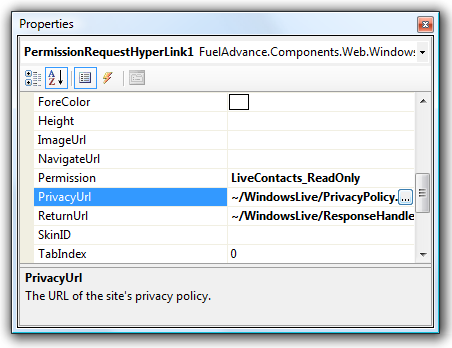
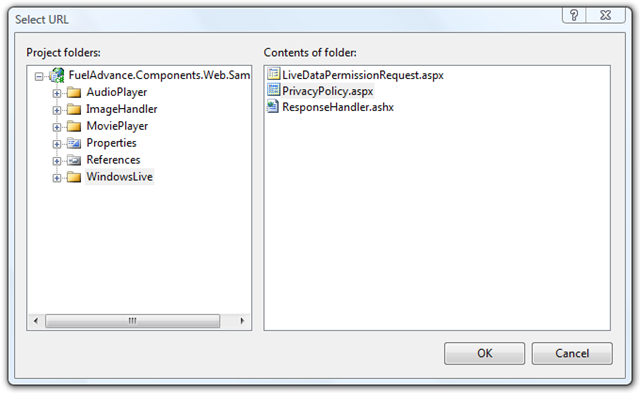
That’s as simple as adding two attributes to the property:
[Editor(“System.Web.UI.Design.UrlEditor, System.Design, Version=2.0.0.0, Culture=neutral, PublicKeyToken=b03f5f7f11d50a3a”, typeof(UITypeEditor))]
[UrlProperty]
public string SpellCheckerUrl
{
get { return ViewState[“SpellCheckerUrl”] as string ?? string.Empty; }
set { ViewState[“SpellCheckerUrl”] = value; }
}
Document with XML and attributes
IntelliSense reads the XML comments, but the designer reads attributes. Document your control’s API surface using both of them.This is a bit annoying, but really not that hard and well worth it. Make sure to specify the summary in XML, as well as the Category and Description attributes.
Our typical property now looks something like this:
/// <summary>
/// Gets or sets the URL of the return handler (a handler inheriting from <see cref=”PermissionResponseHandler”/>).
/// This should be a URL to a HTTPS resource to avoid a scary warning being shown to the end user.
/// </summary>
[Category(“Behavior”)]
[Description(“The URL of the return handler (a handler inheriting from PermissionRequestReturnHandler).”)]
public string ReturnUrl
{
get { return ViewState[“ReturnUrl”] as string ?? string.Empty; }
set { ViewState[“ReturnUrl”] = value; }
}
If you look closely, you’ll notice the documentation isn’t actually duplicated anyway … the messaging is slightly different between the XML comment and the attribute as they are used in different contexts.
Provide lots of designer hints
In the spirit of attributes, let’s add some more to really help the designer do what we want.
For properties that aren’t affected by localization, mark them as such to reduce the clutter in resource files:
[Localizable(false)]
Define the best way to serialize the data in the markup. This ensures a nice experience for developers who do most of their setup in the design, but then want to tweak things in the markup directly.
[PersistenceMode(PersistenceMode.Attribute)]
Declare your two-way binding support. If you mark a property as being bindable (which you should) then you also need to implement INotifyPropertyChanged (which you should):
[Bindable(true)]
Declare default values. Doing so means that only properties that are explicitly different will be serialized into the markup, keeping your markup clean.
[DefaultValue(“”)]
Clearly indicate properties that are read-only. Doing so will make the read-only in the designer, rather than throwing an error when the user tries to set them:
[ReadOnly(true)]
If a property isn’t relevant to the design-time experience, hide it.
[Browsable(false)]
[DesignerSerializationVisibility(DesignerSerializationVisibility.Hidden)]
At the class level, it’s also good to define your default property so that it can be auto-selected first in the property grid.
[DefaultProperty(“Text”)]
Don’t get creative with IDs
ASP.NET has a great system for managing client side IDs and avoiding any conflicts – use it.
Use the ClientID property, and where needed, the INamingContainer interface. Don’t create IDs yourself.
Define your tag template
Add a ToolboxData attribute to your control class so that users get valid code when they drag it on from the toolbox:
[ToolboxData(“<{0}:XhtmlEditor runat=\”server\”></{0}:XhtmlEditor>”)]
Define your tag prefix
Define a tag prefix so that your controls have a consistent appearance in markup between projects.
[assembly: TagPrefix(“FuelAdvance.Components.Web”, “fa”)]
You only need to do this once per assembly, per namespace. Your AsssemblyInfo.cs file is generally a good place to put it.
Update 6-Nov-07: Clarified some of the writing. Added another screenshot.
Loading Collections into Virtual Earth v6
Update: Keith from the VE team advised on the 17th November 2007 that this issue is now fixed. Closer to 3 weeks than the advised 3 days, but at least it’s resolved.
Microsoft launched version 6 of the Virtual Earth API last week. Keeping with the product’s tradition, they broke some core features too. In particular, the ability to load a collection from maps.live.com directly in to the map control.
We use this approach on a number of our sites (the latest being visitscandinavia.com.au) because it basically gives us the mapping CMS for free. The client can create pushpins with text and photos, draw lines and polygons, all in the maps.live.com interface. They then just copy-paste the collection ID into our web CMS.
The problem is that in V6, the load method doesn’t throw any errors but it also doesn’t load any pins. We tried rolling back to V5, but that just brought back old bugs (like the pushpin popups appearing in the wrong place if you actually use a proper CSS column layout instead of tables).
This is the workaround I came up with (inspired by http://forums.microsoft.com/MSDN/ShowPost.aspx?PostID=2276610&SiteID=1).
Loading of GeoRSS feeds still work fine, and we can get to our collections as GeoRSS feeds (the UI is a bit convoluted, but you can do it). Of course, we can’t load the feed directly from maps.live.com though because that would be a cross-domain call.
The proxy to get around this is pretty simple – just a generic handler (ASHX) in ASP.NET:
namespace SqueezeCreative.Stb.WebUI
{
public class VirtualEarthGeoRssLoader : IHttpHandler
{
public void ProcessRequest(HttpContext context)
{
string collectionId = context.Request[“cid”];
string geoRssUrl = string.Format(“http://maps.live.com/GeoCommunity.asjx?action=retrieverss&mkt=en-us&cid={0}”, collectionId);WebRequest request = WebRequest.CreateDefault(new Uri(geoRssUrl));
WebResponse response = request.GetResponse();string geoRssContent;
using (StreamReader reader = new StreamReader(response.GetResponseStream()))
geoRssContent = reader.ReadToEnd();context.Response.ContentType = “text/xml”;
context.Response.Write(geoRssContent);
}public bool IsReusable
{
get { return false; }
}
}
}
We can then call this handler from out client-side JS like so (where B33D2318CB8C0158!227 is my collection ID):
var layer = new VEShapeLayer();
var veLayerSpec = new VEShapeSourceSpecification(VEDataType.GeoRSS, ‘VirtualEarthGeoRssLoader.ashx?cid=B33D2318CB8C0158!227’, layer);
map.ImportShapeLayerData(veLayerSpec, function() {}, true);
Their ETA for fixing this was 3-5 days, but that seems to have gone out the window.
I hope this helps in the mean time!
 Tatham Oddie
You must be logged in to post a comment.