I work on the web.

Readify’s CTO Mitch Denny just announced Damian and myself as the first two Readify staff to receive the new title of “Technical Specialist”. This is an additional title to represent technical focus beyond our standard consulting commitments. Over the coming weeks, this will be awarded in a number of key technology areas. Obviously, for Damian and myself, it’s the web. 🙂

As part of the position we needed to do a bit of a refresh on our consulting profiles, a component of which is a blurb about why we work in the industry. Having just written mine, I felt like sharing it:

The web was never a platform I explicitly sought out; it was more so somewhere I ended up, but I ended up here for a reason. The shear breadth and power of the web, from both technical and business perspectives, made it a natural fit as I developed my career and skill sets.

I’ve always been fascinated by how a relatively simple set of building blocks designed through the 70s and 80s now underpin so much of what we do today. Video calling might look all fancy and futuristic, but it’s still sitting on much of that same technology. It’s this ability to foster evolution and innovation in an open, neutral and (mostly) democratic way that makes the web both possible and exciting.

Mass organic adoption of the web has today given us a heterogeneous environment of networks, devices and software clients that can be quite accurately described as somewhat hostile. Navigating these challenges to deliver a robust and compelling solution, while also seeking to drive the web forward, is what I do as a web specialist.

Microsoft’s early forays into web development were designed to make it an easy transition for their existing community of developers. This approach has resulted in a generation of developers who work on the web without necessarily being fully aware of its scope or potential. Microsoft’s current push is to now bring these developers across to the next iteration of the web. Engaging these audiences and encouraging them to that take that next step is a key component of what I do as an active community member.

In an ever increasingly connected world, now is the time to work on the web.

Why do you work on the web?

(While you’re thinking about it, check out iworkontheweb.com)

Missed TechEd Australia? Get the content anyway.

Close on the heels of TechEd Australia, Readify have announced their latest Dev Day event. This time, we’ve also tweaked the structure a little bit so that instead of having two tracks at the same time we’ll be running a morning track and an afternoon track. This way you get to see it all, or just pop in for the half day if you want.

Richard Banks will be presenting in the morning on Software Quality and Application Lifecycle Management, split into:

  • Gathering Quality Requirements for Agile Development Teams, and an
  • Introduction to Visual Studio Team System 2010.

In the afternoon, I’ll be covering Building for the Web with .NET through three different presentations:

  • Building Fast, Standards Compliant ASP.NET Websites,
  • ASP.NET MVC: Building for the web, and an
  • Introduction to the ASP.NET Web Forms Model-View-Presenter framework.

For my talks, you can find some teasers between my last two blog posts and CodePlex.

To see it all, you’ll just have to come along though. 🙂

More info at: http://readify.net/training-and-events/rdn-dev-days/

See you there!

Video: Building Fast, Public Websites

Following up from my last post about the ASP.NET MVC vs ASP.NET WebForms debate, we’ve had a second TechTalk posted, also from TechEd Australia. In this video, Michael Kordahi, Damian Edwards and I sat down to discuss building fast, public websites. It was a bit of a teaser for our breakout session at the conference, which will be available online as a screencast in the next week or two.

If you’re interested in learning more about building large public websites on ASP.NET, remember that the full video from our recent REMIX session is still available online too.

Building Fast, Public Websites

Watch Online or Download

Video: ASP.NET MVC vs ASP.NET WebForms – Will WebForms be replaced by MVC?

At the recent TechEd Australia conference, Paul Glavich, Damian Edwards and myself sat down to discuss what we thought about the current MVC vs WebForms debate. Our TechTalk has now been posted on the TechEd Online site, and available for anyone to watch.

Check it out, and feel free to continue the debate with any of us. 🙂

ASP.NET MVC vs ASP.NET WebForms – Will WebForms be replaced by MVC? 

Watch Online or Download

Announcing: OpenSearch on ASP.NET made super easy with the OpenSearch Toolkit

OpenSearch is a technology that already has widespread support across the web and is now getting even more relevant with Internet Explorer 8’s Visual Search feature and the Federated Search feature in the upcoming Windows 7 release.

Recently I blogged about some work I’d been doing with OpenSearch and how frustrating the whole process was. By the time you build feeds for IE8, Firefox and Windows 7 you’ve touched on “standards” documented by Amazon, Yahoo, Mozilla and Microsoft. Good luck tracking down all that info and working out the discrepancies!

As a first step to making this easier, I released the OpenSearch Validator so we had a quick way to track down all the potential issues and get a clear indication of whether our OpenSearch implementation was going to work in all environments we wanted it to. I also released the source code for this on CodePlex so that you can run it in your internal dev environments or even integrate it into your build process.

Now it’s time to make it even easier. Ducas Francis, one of the other members of my team, took on the job of building out our JSON feed for Firefox as well as our RSS feed for Windows 7 Federated Search. More formats, more fiddly serialization code. Following this, he started the OpenSearch Toolkit; an open source, drop-in toolkit for ASP.NET developers to use when they want to offer OpenSearch.

Today marks our first release.

Implementing OpenSearch

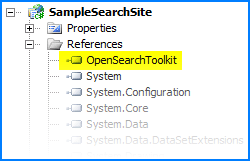
First up, download the latest release of the project from CodePlex and add it to your project references:

Reference

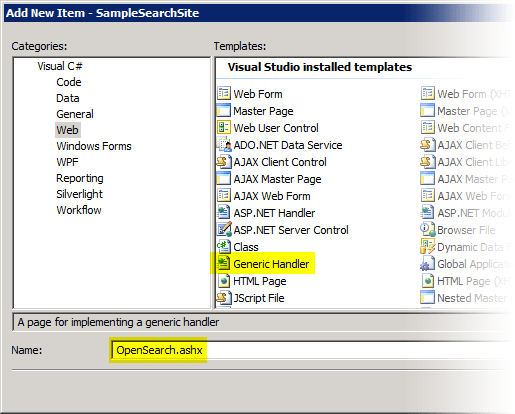
Next, add a new Generic Handler to your project called OpenSearch.ashx:

GenericHandler

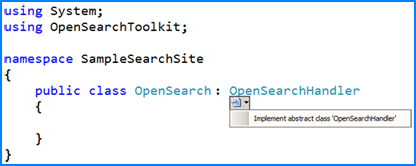
In the code behind for the handler (OpenSearch.ashx.cs), remove the autogenerated code and change the base class to OpenSearchHandler:

BaseClass

Now, just start implementing the abstract properties and methods on the base class.

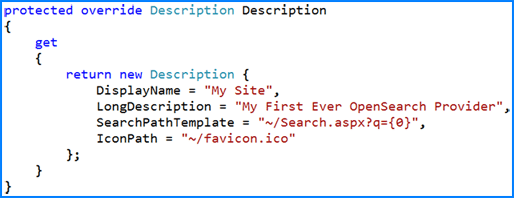
The first one you’ll want to implement is the Description property. This returns the basic meta data about your provider that will be shown when users choose to add it to their browser’s list of search providers. You also need to specify the SearchPathTemplate which is a format string that the OpenSearch Toolkit will use to generate links to your site’s search page.

Description

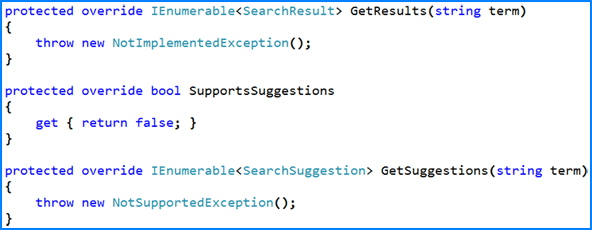
Next, implement each of the data methods. GetResults is the most important one that you need to implement. It should return an array or collection of about 5 to 8 search results, preferably with thumbnail images.

Implementing GetSuggestions is a little bit harder, and we don’t expect everyone to do it. The idea of this method is to return suggestions for other search terms. For example, if the supplied term was “Aus” you might return “Australia” and “Austria” as suggestions. The process of generating these results from your data is naturally a bit harder.

Results

At this point you have a fully functional OpenSearch endpoint.

The last step is to tell the world about it by adding a small snippet of HTML to the <head> section of each of your pages:

<link title="My Site" rel="search" type="application/opensearchdescription+xml" href="~/OpenSearch.ashx" />

Voila! Your users will now get to experience full OpenSearch support from your website:

VisualSearch

What’s wrong with Outlook?

It has been an interesting few weeks in the world of web standards for email.

The boys from Campaign Monitor executed a successful awareness campaign in the form of fixoutlook.org which rapidly racked up over 24,000 Tweets and overtook the Iran Election in Twitter’s trending topics. Unfortunately for all of us, it has been a case of message received – but not understood.

The Core Problem

Back in 2007, Microsoft swapped the Outlook rendering engine from Internet Explorer to Word. This in itself is not a problem at all; and actually delivered some really good improvements. There was now one-to-one fidelity between the authoring and viewing experiences because they were one and the same.

I like having Word as my authoring tool. I like features such as SmartArt and the context aware picture tools.

In making this switch though, we inherited the woeful CSS support that Word has. Microsoft’s developer documentation lists Word 2007 as supporting “a subset of the standard HTML 4.01 specification, […] the Internet Explorer 6.0 HTML specification [and] a subset of the standard Cascading Stylesheet Specification, Level 1.” That’s even less support than Internet Explorer 5 had.

Why does this matter?

This isn’t just some web standards movement for the fun of it – there is real business impact here. No, it’s not something that end users will bang their head against. It’s something that affects all of us web designers.

Two of the key areas that are lacking in the rendering engine are support for the float and background-image. The former throws us back to the dark ages of table based layouts and all their inherent accessibility and layout issues. The latter means that there are some designs you just can’t do at all. Try placing today’s date on top of a graphic header in an email and let me know how you go.

In a comment that I consider a bit unfair, Microsoft’s official response referred to Campaign Monitor as makers of “email marketing campaign” software (complete with those quotes). Another thread I stumbled across described the fixoutlook.org campaign as being about the ability to deliver “bloated HTML with pixel trackers, domain redirectors and Google Ads”.

This is not a movement to aid in the delivering of spam. There are legitimate reasons for delivering automated and/or bulk emails to users. Campaign Monitor goes above and beyond the legal requirements to make sure their system is not misused.

This movement is about being better online citizens:

  • Bloated HTML? Float-based layouts are much leaner and faster to render than table-based layouts.
  • Pixel trackers? We can do that in Word already – no change here.
  • Domain redirectors? I don’t even know what they are in this context and Bing doesn’t seem to either.
  • Google Ads? We’re not talking about running scripts at all.

Why does it really matter?

Personally, I think one of the most amusing demonstrations of why this really matters comes from one of Microsoft’s own newsletters:

XBox Newsletter

Notice that message on the top? “Read this issue online if you can’t see the images or are using Outlook 2007.” The authors of this newsletter probably deemed that Outlook 2007’s rendering engine required too much extra work for them to support it that the business case just didn’t exist.

We’re going through this same experience at the moment for one of the largest online presences in Australia. Having got our templates working in all of the major email clients except Outlook 2007 and Gmail, it was time to see what we could do about these last two stubborn children. In the end, it took twice the amount of time to make it Outlook 2007 compatible than it did to develop it in the first place. (And no, Gmail is never a pretty story either but that’s not an excuse Microsoft should be using.)

It’s not all about mass marketing either.

Here’s how one of my opt-in Twitter notifications renders side-by-side in Word and IE:

Side-by-side rendering of Twitter email in Word and IE

(click for full size)

Why now?

There have been some comments floating around asking why we’re only just starting to care now. I think this is a valid question, with two answers.

First and foremost, email has always been a right pain and thus the Email Standards Project was born in 2007. This project has gone on to make head way with some of the biggest names in the email game. Unfortunately though, there has been lack lustre response from Microsoft to date (including even to this targeted campaign).

Secondly, while this problem has been present since Outlook 2007, the big concern is that there doesn’t appear to have been any recourse made in Outlook 2010. To be fair, no official builds have been released yet and thus the fixoutlook.org campaign is being driven on evidence gained from a pre-beta build. With all that in mind though, you’d think that Microsoft could have mentioned something in their reply if they were working in this area. They didn’t. Also, now is our last chance to try and make an impact on Outlook 2010 before it gets locked down into the full testing regime.

Standard? What standard?

Microsoft’s official response correctly identifies that “there is no widely-recognized consensus in the industry about what subset of HTML is appropriate for use in e-mail for interoperability.” They are also correct in identifying that “the Email Standards Project does not represent a sanctioned standard or an industry consensus in this area.”

As I highlighted at the start of this post, Microsoft have explicitly stated that the HTML and CSS support in Word 2007 is but a subset of existing standards. It is also interesting to note that they refer to the Internet Explorer 6.0 HTML Specification, another document which is not a sanctioned standard or an industry consensus in this area (or any, really).

It should be recognised that Email Standards Project is not about developing a new standard, or even a subset of an existing one. It does not portray itself to be a standards organisation at all.

This is demonstrated on their homepage by the clear mission statement:

Our goal is to help designers understand why web standards are so important for email, while working with email client developers to ensure that emails render consistently. This is a community effort to improve the email experience for both designers and readers alike.

In doing so, they have developed an acid test that they can use to measure the relative performance of each of the clients. This test is a subset of the existing standards, and a subset that they have arbitrarily agreed upon, however it is simply a tool for providing relative comparisons in the same way that we use the ACID1, ACID2 and ACID3 tests for web browsers. In fact, the IE 8 team considered passing ACID2 to be a milestone for their product’s development.

Meet in the middle?

The rendering comparison provided on fixoutlook.org does include one little morsel of hope. At the top of the Outlook 2010 rendering, you’ll notice an information bar that says “If there are problems with how this message is displayed, click here to view it in a web browser”. We can fairly safely assume that this will either flick the rendering engine to IE for that message only, or save it out to a temporary location and fire up the user’s default browser. The latter will have some challenges around embedded MIME data, however I imagine this is something they would have already solved in the pre-Word days of Outlook’s rendering.

Let’s get back to the original issue for a second: Word is being used to ensure a congruent authoring and rendering experiences, and a side effect of this is that emails authored with specific HTML and CSS do not render well.

Sound familiar? Web browsers solved this problem years ago with the introduction of multiple rendering modes driven by doctype switching. This has been adopted by every major browser manufacturer, including Microsoft, as a way of ensuring wide compatibility with varying levels of standards support.

The idea is by no means unique, but what’s stopping us from having Word as the rendering engine for emails received from another Outlook instance and IE as the rendering engine for emails the rest of the time?

  1. There is evidently code there already to detect when an IE-based render would produce better quality results.
  2. MIME already includes enough information for one to determine what application authored a message.
  3. I don’t think anybody is currently too concerned about the amount of rendering that is preserved when one attempts to forward an EDM. This is troublesome ground across every email client out there.

We don’t need to radically change Word to support a whole bunch of new renderings. We don’t need to tear Word out of Outlook (despite what some of the campaign supporters have been saying).

All we’re asking for is a reliable and consistent way for the web developers of the world to deliver styled emails to Oulook, one of the best messaging platforms out there.

Updates

6th July, 1501: John Liu accurately brought up the anti-trust restrictions around the packaging of Internet Explorer. These restrictions apply to the shipping of Internet Explorer as a product, and do not relate to the underlying rendering engine (mshtml.dll). In fact, The Help & Support interface in Windows 7 relies on this rendering engine itself:

image

Diagnosing Stack Overflow Faults in ASP.NET Production Environments

WinDbg is a tool that is immensely useful, but painfully hard to get any value from if you don’t know how to use it. On a few occasions I’ve found myself in a situation where I knew that WinDbg could give me the answer, but I didn’t have enough knowledge of how to use it.

This week we performed a production deployment on one of the projects I am involved in. Pretty soon after, we started to notice some issues cropping up that were affecting the performance and stability of the whole site.

In this scenario, WinDbg was a life saver for us.

The first sign that something was wrong was this event getting fired across the whole front-end tier:

03 Jul 2009 08:32:43 AM
Computer: WEBTIER14
Monitor Title: "Event Log Monitor" (Type=Event Log Monitor)
Description:
* Event Time: 03 Jul 2009 08:32:42 AM
* Source: .NET Runtime 2.0 Error Reporting
* Event Log: Application
* Type: Error Event
* Event ID: 1000
* Faulting application w3wp.exe, version 6.0.3790.3959, stamp 45d6968e, faulting module kernel32.dll, version 5.2.3790.4062, stamp 4626467c, debug? 0, fault address 0x00022366.

We also noted that CPU usage was spiking erratically and was well above the average we would expect for the number of firewall connections we had open.

This event log entry was telling us that the w3wp worker process was faulting in an unrecoverable way, causing the application pool to be torn down in IIS. The nature of the fault was also causing the Windows Error Reporting dw20.exe process to trigger and try capturing a mini dump. These rapid recycling combined with the CPU and IO intensive task of capturing a mini dump was killing our servers and we needed to act fast.

The first step was to work out what was causing the process to be torn down in the first place, as the impact of Windows Error Reporting’s automated analysis was only a secondary issue. To capture this information, I used the adplus script in the Debugging Tools for Windows package to capture a dump.

In its default configuration, adplus will capture a crash dump on any first chance exception. Being an ASP.NET application there are a number of exceptions that we expect to be thrown as 404s are reported, redirects are performed, etc. As such, running adplus in its default configuration was causing it to grab the crash dump too frequently and not giving us the fault that was causing the complete teardown.

To capture the process teardown fault, I ran adplus with these parameters:

adplus.vbs -pn w3wp.exe -c Unknown.cfg

The first parameter just says that we want to capture dump data for the w3wp.exe process. The second parameter is the interesting one – I am passing in a configuration file that includes some exception filters. I grabbed this config from Tess’ blog.

The content of the configuration file is fairly simple XML that describes the unknown fault scenario:

<adplus>
    <settings>
        <runmode> CRASH </runmode>
    </settings>
    <exceptions>
        <config>
            <code>AllExceptions</code>
            <actions1>Log</actions1>
            <actions2>MiniDump;Log;EventLog</actions2>
        </config>
        <newexception>
            <code> 0xe053534f </code>
            <name> Unknown_Exception </name>
        </newexception>
        <config>
            <code> 0xe053534f </code>
            <actions1>FullDump;Log;EventLog</actions1>
            <actions2>FullDump;Log;EventLog</actions2>
        </config>
    </exceptions>
</adplus>

With the debugger now attached, it was a simple matter of waiting for the problem to occur. In our scenario it was happening every 10 to 15 minutes per server, so it took a while for me to capture the dump. Finally, the console showed “Dump file successfully written”.

To analyse the dump file, I opened windbg.exe, chose Open Crash Dump and selected the .dmp file that had been written out. You’ll usually find it in a CrashDump folder next to where you ran adplus from.

As we are working with a .NET application, but WinDbg is a native debugger, my next step was to load a set of debugger helpers called SOS. This is basically a plugin for WinDbg that lets us access information about the CLR state.

To load it, run:

.loadby sos mscorwks

The period at the start says it’s a WinDbg core command. The next parameter is the name of the library we want to load into the debugger. The final parameter is basically a relative file base – we’re telling WinDbg to load SOS from the same location that mscorwks had been loaded from. mscorwks is the .NET runtime, so this approach helps ensure we are loading the correct version and architecture of SOS and it saves us from having to write out the full path.

Next, I wanted to see what point of our application we were in when the process faulted. With SOS loaded, the command is quite simple:

!clrstack

Instantly, it was obvious that we had a stack overflow problem. This was made clear by literally hundreds of repeated frames on our call stack. It also explained why our ASP.NET Health Monitoring wasn’t reporting an exception, as a stack overflow causes the whole process to be torn down before any exception handling code can be run.

Here’s a short snippet (with the project details masked out):

...
CompanyName.Project.Web.Logic.Component.Method1(System.String, System.Int32)
CompanyName.Project.Web.Logic.Component.Method2(System.String)
CompanyName.Project.Web.Logic.Component.Method1(System.String, System.Int32)
CompanyName.Project.Web.Logic.Component.Method2(System.String)
CompanyName.Project.Web.Logic.Component.Method1(System.String, System.Int32)
CompanyName.Project.Web.Logic.Component.Method2(System.String)
CompanyName.Project.Web.Logic.Component.Method1(System.String, System.Int32)
CompanyName.Project.Web.Logic.Component.Method2(System.String)
CompanyName.Project.Web.Logic.Component.Method1(System.String, System.Int32)
CompanyName.Project.Web.Logic.Component.Method2(System.String)
CompanyName.Project.Web.Logic.Component.Method1(System.String, System.Int32)
CompanyName.Project.Web.Logic.Component.Method2(System.String)
CompanyName.Project.Web.Logic.Component.Method1(System.String, System.Int32)
CompanyName.Project.Web.Logic.Component.Method2(System.String)
...

The component in question is used across almost all of our pages and the site wasn’t completely down, so I could now derive that it was being caused by a very specific piece of data. This leads us to our next challenge, which is to find out what which record was triggering the problem.

To do so, I ran:

!clrstack -p

The argument of -p asks SOS to list out all of the parameters for each stack frame.

Finding out the URL of the current request is a non-trivial task, and not all parameters are available due to runtime optimisations. Rather than persisting in a search for the URL, it was much easier to grab another stack frame which included the information I needed:

1947ed28 1abb1c7e CompanyName.Project.Web.Logic.Presenters.RetailItemPresenter.View_ItemLoading(System.Object, CompanyName.Project.Web.Logic.Views.ItemLoadingEventArgs)
PARAMETERS:
this = 0x04144bf8
sender =
e = 0x04151b38

This is the event handler on one of our presenters being called as a result of the ItemLoading event being fired on the corresponding view. This approach is specific to our MVP architecture, but it was a known and simple entry point into most of the stack. Try and look for an equivalent call in your own stack.

I could now see that it was a particular retail item triggering the problem, and I knew that the information I needed was in the event arguments. You can see the parameter on the stack frame shown as e = 0x04151b38. That number is the memory location of the object we need.

To get the object, I then ran:

!do 0x04151b38

The !do command is a shortcut for !DumpObject, and gave us this output:

Name: CompanyName.Project.Web.Logic.Views.ItemLoadingEventArgs
MethodTable: 19ef2170
EEClass: 19d49b70
Size: 12(0xc) bytes
(c:\WINDOWS\Microsoft.NET\Framework\v2.0.50727\Temporary ASP.NET Files\root\aef04219\e69835b3\assembly\dl3\29e5062003a4007_a4fac901\CompanyName.Project.Web.Logic.DLL)
Fields:
MT Field Offset Type VT Attr Value Name
7932a400 4000183 4c System.EventArgs 0 shared static Empty
>> Domain:Value 001cc630:NotInit 00204700:03043914 <<
793308ec 4000819 4 System.String 0 instance 0412522c <RetailItemId>k__BackingField

We can now see the RetailItemId property and its corresponding backing field. The value column on that line is 0412522c, which is another memory reference.

Once again, we dump the memory reference:

!do 0412522c

This returns us the corresponding System.String object:

Name: System.String
MethodTable: 793308ec
EEClass: 790ed64c
Size: 28(0x1c) bytes
(C:\WINDOWS\assembly\GAC_32\mscorlib\2.0.0.0__b77a5c561934e089\mscorlib.dll)
String: 6T046
Fields:
MT Field Offset Type VT Attr Value Name
79332b38 4000096 4 System.Int32 1 instance 6 m_arrayLength
79332b38 4000097 8 System.Int32 1 instance 5 m_stringLength
793315cc 4000098 c System.Char 1 instance 36 m_firstChar
793308ec 4000099 10 System.String 0 shared static Empty
>> Domain:Value 001cc630:02fe01d0 00204700:02fe01d0 <<
7933151c 400009a 14 System.Char[] 0 shared static WhitespaceChars
>> Domain:Value 001cc630:02fe0728 00204700:06fe0e14 <<

Hidden away on the sixth line there is the raw string value, 6T046, which was the product id.

At this point, we had:

  1. Captured a complete memory dump of the w3wp.exe process when the fault occurred
  2. Identified a stack overflow to be the cause of the fault
  3. Identified the area of our code that was involved in the stack overflow
  4. Identified the particular piece of data that was exposing the bug

We could now:

  1. Perform a quick fix to the data to circumvent the bug and get the website performant and stable again
  2. Reproduce the bug locally using the same data that caused the issue
  3. Have the lazy Friday we’d been hoping for

Video: Building great standards based websites for the big wide world with ASP.NET 4.0

The video recording from Damian and my session at REMIX Sydney last week is now online. Thanks to some funky aspect ratio issues we both look really buff too.

In this session, two ASP.NET MVPs will share their experiences from building Australia’s largest e-commerce site with ASP.NET Web Forms. They’ll show you how to be a good web citizen by covering standards compliance (properly!), cross browser and accessibility considerations, non-JavaScript support, as well as coding techniques like the Model-View-Presenter pattern to improve maintainability and testing. Along the way, there’ll be plenty of discussion of the differences between Web Forms and ASP.NET MVC in each area, as well as an early peek at some of the new features coming in ASP.NET 4.0 and VS 2010.

Building great standards based websites for the big wide world with ASP.NET 4.0 – watch online

Building great standards based websites for the big wide world with ASP.NET 4.0 – download WMV

The resources from our talk are now all online (including the ones that hadn’t been released yet on the day):

We also talked about the CSS Friendly Control Adapters which are again open source, under MS-PL.

While you’re checking out the videos, take a look at Jordan’s rockin’ Silverlight 3 Super Session. Not all of the videos are up yet (like, most of them aren’t), and I imagine that from the feedback flowing in there might be an updated version of the videos soon, so keep watching the videos page for some other really good content.

Updated @ 1601, 18th June: The video page interface has been updated to support deep linking so I’ve update this post to include links to the in-page players.

Updated @ 1053, 20th June: Added links to resources now that they’re all been published.

Released: XHTML Markup Sanitizer

Last week at Remix I demonstrated a markup sanitizer that I’d been working on and announced that it’d soon be available as open source. After a few days and a bit of intellectual property management, I’ve finally managed to get it up on CodePlex under the MS-PL license.

http://markupsanitizer.codeplex.com

The XHTML Markup Sanitizer takes untrusted (X)HTML and massages it into real, trusted XHTML. While plenty of effort goes into preserving the original intent, markup validity and safety is the first priority. It’s particularly useful with content management systems where users are in control of markup, but you want to target XHTML1.1.

The sanitizer does not process entire pages. It is designed to massage snippets of text that users might enter in things like blog comments or product descriptions.

Check it out and try it in your project today! Now you have no excuse for not targeting full standards compliance.

Released: OpenSearch Validator

image


http://opensearchvalidator.com

I’ve been doing a lot of work with both OpenSearch and IE8 Visual Search this week. These are the feeds to let you integrate your website into the browser’s search dropdown. Unfortunately the specs are spread across three different organisations (A9, Mozilla and Microsoft) and all rather poorly documented.

We’ve been implementing the feeds on a major e-commerce website, and thus we wanted to make sure we got them right. (We’ll be showing the site in the REMIX keynote next week.)

The solution? I built a validator. As we found new issues, I added them to the validator.

Today I’m releasing that validator for you to test your own sites with.

Some cool ones to check out are:

  • hanselman.com, who has his SearchFrom element in the wrong namespace at the time of writing
  • wikipedia.org, who are serving their visual search suggestions with the wrong media type at the time of writing
  • au.yahoo.com, who are serving their OpenSearch description with the wrong media type at the time of writing
  • bing.com, who don’t even publish a feed at the time of writing

Update 7th June 2009: The source code is now published on CodePlex.