.NET Enumerations: Generic Constraints and Custom Values

Usually whenever I write something semi-cool at work, I get home and tell my flatmate “Hey – check out this semi-cool thing I did today”. He replies “Yeah – that’s cool – you should blog it” to which I respond “Hmmm … maybe later – I’m hungry”. Well, here’s the first post from what is hopefully a series of semi-cool things Tatham did at work one day.

Many of these posts will cover very simple concepts, but they are concepts or code snippets that often get skipped over and thus just aren’t that well documented around the web.


One of the things that occassionally bugs me is that I can’t use a string as a base type for an enumeration. I’m sure there’s a good underlying reason, but when working with existing systems it’d be nice to write something like this:

using FuelAdvance.Components.Common;

namespace FuelAdvance.Components.Payments.Gateways.PayPal
{
    public enum PaymentStatus : string
    {
        CanceledReversal = "Canceled-Reversal",
        Completed = "Completed",
        Denied = "Denied",
        Expired = "Expired",
        Failed = "Failed",
        InProgress = "In-Progress",
        PartiallyRefunded = "Partially-Refunded",
        Pending = "Pending",
        Processed = "Processed",
        Refunded = "Refunded",
        Reversed = "Reversed",
        Voided = "Voided",
        Unknown = "Unknown"
    }
}

Well, .NET doesn’t work that way so behold FuelAdvance.Components.Common.EnumerationHelpers.

Now, we can write our enumeration like this:

using FuelAdvance.Components.Common;

namespace FuelAdvance.Components.Payments.Gateways.PayPal
{
	public enum PaymentStatus
	{
		[Value("Canceled-Reversal")] CanceledReversal,
		Completed,
		Denied,
		Expired,
		Failed,
		[Value("In-Progress")] InProgress,
		[Value("Partially-Refunded")] PartiallyRefunded,
		Pending,
		Processed,
		Refunded,
		Reversed,
		Voided,
		Unknown
	}
}

Really, the code is nicer as we only need to include strings for the three values which include dashes. The Value attribute is about a basic as attributes get, and it doesn’t need to be any more complex.

The EnumerationHelpers class provides the logic for mapping string values to enumeration values and back again:

PaymentStatus status = EnumerationHelpers.GetEnumValue<PaymentStaus>("In-Progress")

In writing the EnumerationHelpers class, I discovered a rather annoying limitation of generic constraints – you can’t constrain to an enum like so:

public static T GetEnumValue<T>(string value) where T : enum
{
    ...
}

Instead, you can only narrow the field as far as a struct, then test the type manually:

public static T GetEnumValue<T>(string value) where T : struct
{
    if (!typeof(T).IsEnum) throw ExceptionHelpers.NewArgumentNotAnEnumException(typeof(T).FullName);
    ...
}

UPDATE: I received an email this morning from Sonny Malhi saying “I’m not sure of the complete intent of the post ‘.NET Enumerations: Generic Constraints and Custom Values’ but if it is to return a description based on a title I believe you should use the [description] attribute if your goign to use a enum type. This way you get a name, value and description from your enum type.

The point of the [Value] attribute is not for UI display – you would still use the builtin [Description] attribute for that. The usefulness of the [Value] attribute is when you’re trying to integrate with an existing API or data source. You’ll notice that the example above is a PaymentStatus enumeration from my PayPal components namespace. PayPal return values from their API such as “In-Progress” which aren’t valid as enumeration item names, and I wanted to avoid writing a ParsePaymentStatus(string) method which just contained a massive switch statement.


You can download the latest version of all the code related to this post from our SVN repository here:

If you find a bug, please email me, or better yet, email me the patch.

Invalid Port Number in href Attribute Breaks DOM in IE7

When writing my Local proxies with IE7 – Solved post, Windows Live Writer helpfully turned http://localhost:xyz/ into a link for me. Unfortunately, this resulted in my WordPress page throwing JS errors on every load.

It turns out that the invalid port number breaks the IE7 DOM, and the WordPress devs (who replied within about 4 hours!) haven’t been able to find a way around the condition.

I have posted a test case here:

http://tatham.oddie.com.au/files/InvalidPortNumberInHrefAttributeBreaksDom/

Annoylingly the Microsoft Connect site for IE7 is closed. I’ve emailed a link to the test case to the IE team via their blog, but if anybody knows of a better way I’d be keen to know.

UPDATE 25/4/07: Links like http://anonymous:@svn.fueladvance2.com/ seem to break it as well as demonstrated if you view my next post in IE7.

Simple Debugging of Server Apps

Here’s some food for thought for anybody who develops server software… I like to know what’s going on without having to jump through hoops.

This post was provoked after spending my weekend on a Server 2003 / Active Directory / Exchange deployment. As part of the system, we are using Ed Forgacs’ wonderful Exchange Connector. It sits in the “it-just-works” category, but I have no idea what the hell it’s doing. If I want to see a log file, I need to give it a SQL database and then I need to go and query the SQL database myself. For 99.999% of the time this is fine, but sometimes I just want to quickly check up on what’s happening.

On one of the servers I manage, we host email for 50 or so of our client’s domains with hMailServer. It’s a great little mail program that just works. (In a hosting environment like this, Exchange is too tightly coupled with Active Directory to be useful.)

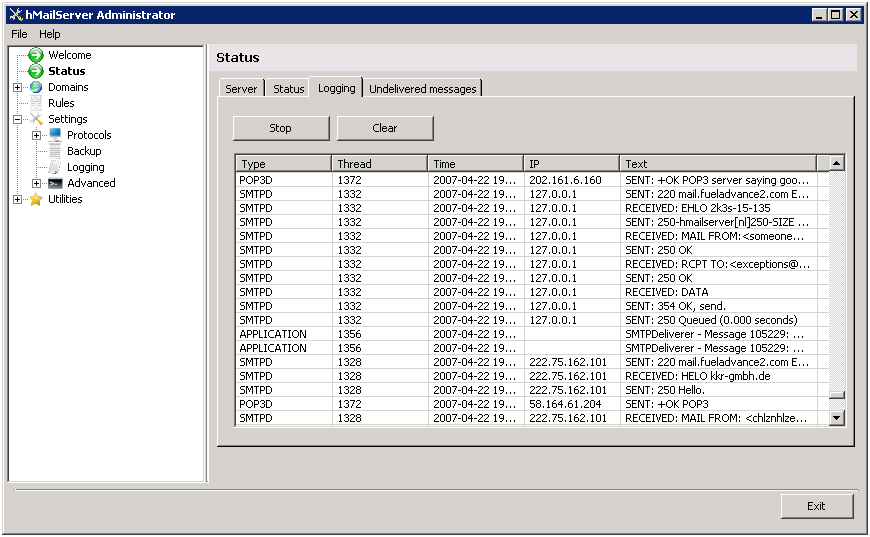
One of the nicest features to the whole program for me is the logging. Sure, I can save a log to a file … like so:


BUT – I can also go to the “Logging” tab quickly and just click “Start”. This is immensely useful for quick little debugging tests.

Local proxies with IE7 – Solved

This has been bugging me …

IE7 always bypasses the proxy when connecting to localhost, irrelevant of what options you choose. This makes life painful if you’re trying to use some like Fiddler when developing a site locally.

If you’re hosting locally with IIS, you can just connect using http://machinename/ instead of http://localhost/.

Unfortunately we don’t have this flexibility with Casini (the one included with VS 2005) as it only accepts connections to http://localhost:xyz/.

Today, I came across the solution thanks to Dominick Baier!

Use http://localhost.:xyz/ (notice the added period between the hostname and the colon).

  • IE7 is no longer sure if it’s local or not, so we get the proxy,
  • it still gets routed correctly, and
  • Casini still accepts the connection.

The Missing Feature with ASP.NET Forms Found: Default Buttons

In the real world of HTML, you use a separate <form> tag for each form on your page. If I have a currency converter in my travel website’s sidebar, it has its own form tag. As a result, when I press “enter” in a text field, the right submit button is pushed and only that form is submitted.

In ASP.NET we just wrap the whole page in one massive hack of a <form>-esque tag.

<rant>That bit always annoys the hell out of me – but I guess that what’s you get when you let architects try and replicate a windows development model onto the web.</rant>

The most annoying thing however has always been how to map the “enter” effect to the right button. Well, in ASP.NET 2.0 a feature shipped that I never noticed – and it’s pretty cool.

    <asp:Panel DefaultButton="MyButton" runat="server">
        ... my form here ...
    </asp:Panel>

It still submits everything to the server, which is a bit wrong, but at least you get the right UI model.

It omits horendous output:

    <div onkeypress="javascript:return WebForm_FireDefaultButton(event, 'ctl00_ctl00_ContentPlaceHolder_ctl10_ConvertButton')">

…but I guess with a megahack like <form runat="server"> there’s not much you can do besides hack it further.

My excitement about this feature, mixed with the disappointment of <form runat="server"> has left me in the same mood I started in.

CSS and Diff/Patch support added to Vista and Office 2007 Code Preview Handler Pack

Even more file types now supported!

Read more about the Vista and Office 2007 Code Preview Handler Pack

Download the Vista and Office 2007 Code Preview Handler Pack

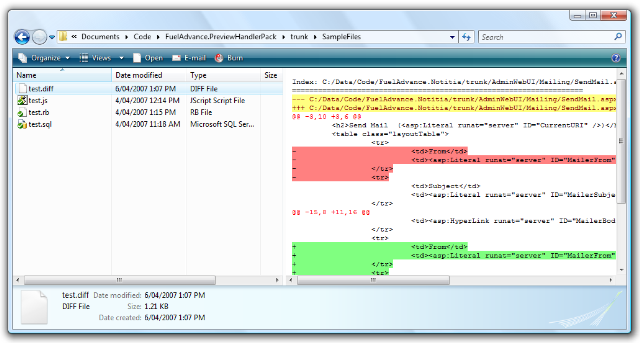
This is what CSS files look like:

And this is what patch files look like:

This build also includes some preliminary support for batch files, however I’m not yet happy with the colors and some things aren’t being colorized (like the labels):

Ruby and JScript support added to Preview Handler Pack

I’m pleased to announce that Ivan Porto Carrero and I have managed to add support for Ruby and JScript files to the Preview Handler Pack.

The updated pack is available for download here: PreviewHandlerPackSetup.msi

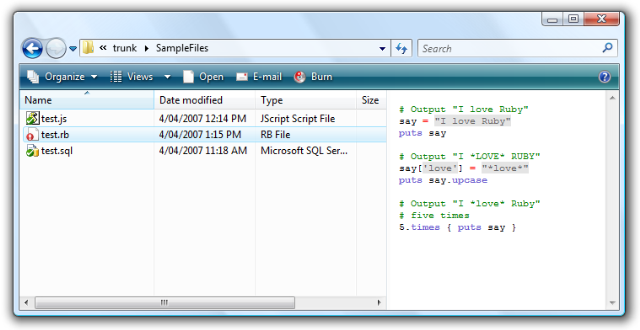
Ivan added support for Ruby (.rb, .rhtml, and .rjs) files:

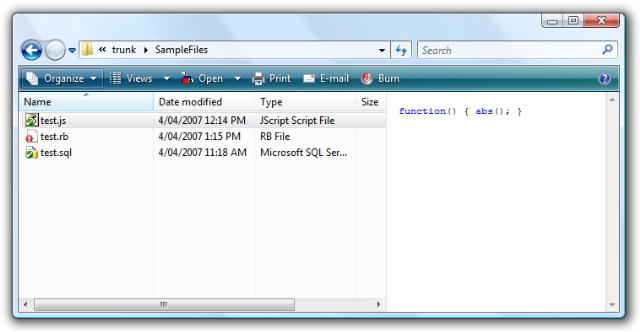
And I addedsupport for JScript (.js) files:

Generating HTML emails using ASP.NET

It’s a pretty common requirement these days to send a nicely formatted email, yet I’ve come across very few “nice” solutions.

The solution I’ve come to use is simple, and documented across the web, but rarely used in the real world.

The most common code I see (and what I used to write back in the days of .NET1.0 powered dinosaurs roaming the earth) revolves around ugly use of the StringBuilder:

MailBody.Append("<html><head></head><body> \n");
MailBody.Append("<span style=\"font-size: 11 px; font-family:Verdana,Helvetica, sans-serif\">Hi,<br><br>Your account information as it has been retrieved from the database:</span><br><br> \n");
MailBody.Append("<div style=\"font-size: 11 px; font-family:Verdana,Helvetica, sans-serif\">Username: " + UserData.Username + "<br><br>" + "Password: " + UserData.Password + "</div> \n");
MailBody.Append("</body></html>");

Ugly. Unmaintainable.

Instead, create a user control for your email template using standard ASP.NET controls:

<%@ Control Language="C#" AutoEventWireup="true" CodeBehind="PasswordRecovery.ascx.cs" Inherits="SampleApp.WebUI.EmailTemplates.PasswordRecovery" %>
<h1>Password Recovery</h1>
<p>Your new password is <asp:Literal ID="NewPassword" runat="server" />.</p>

Expose a property for each value that you need to include in the email:

public string Password
{
     get { return NewPassword.Text; }
     set { NewPassword.Text = value; }
}

Now just render the control on demand:

private string RenderControl(Control control)
{
    StringBuilder stringBuilder = new StringBuilder();
    StringWriter stringWriter = new StringWriter(stringBuilder);
    HtmlTextWriter htmlTextWriter = new HtmlTextWriter(stringWriter);

    control.RenderControl(htmlTextWriter);

    return stringBuilder.ToString();
}

How simple is that. 🙂

UPDATE: I should mention how to instantiate the control – just calling the default constructor isn’t good enough as you’ll find that all of your controls are null. This is the magic line you’ll need:

EmailTemplates.MembershipApplication emailTemplate = (EmailTemplates.MembershipApplication)LoadControl("~/EmailTemplates/MembershipApplication.ascx"); 

Things I plan to do in Sydney this summer…

Visit Flickerfest (more info) (Done 8th Jan)

Bondi Pavilion, Jan 5-14, $15/$13

Flickerfest began as a small local festival at the Balmain High School in 1991. Over the last 16 years it has grown to become Australia’s only competitive International Short Film Festival with entries coming from filmmakers across the globe.

Flickerfest is considered in International circles as the leading Australian competitive short film festival and increasingly filmmakers view it as one of the main festivals on the world circuit. To maintain this high standard each year the festival director visits festivals around the world seeking new films most of which have not been seen in Australia.

See Crackers? (more info)

Wentworth Common (Olympic Park), Jan 19-21, Free

The World Famous is an internationally acclaimed company of creative pyrotechnicians, with a passion for playing with fire. Their latest creation – a free event for those who dare – is definitely not for the faint of heart.

The world is full of risks to be avoided. Cities are crowded, disease is rife, threats lie all around – and fireworks are too loud. We are only safe when locked in our homes. But some fools deliberately court danger by stepping outside the safety zone, playing with fire, jumping off cliffs, lighting the blue touch paper…

A celebration of the explosive and dangerous beauty of fire, Crackers? is performed ‘in the round’, with the audience surrounded by flames, smoke, spinning wheels and fireworks. A symphony of pyrotechnic sounds fills their ears alongside moments of delicate beauty – dancing flames, glittering saxon wheels and the ‘human sparkler’.

Crackers? is an explosive addition to your Festival calendar.

See Kiss of Life (more info)

Sydney Opera House, Jan 16-20, ~1 hour, $25

A high-risk romantic comedy attempting to do the seemingly impossible: turn a story about attempted suicide into a life-affirming show. Chris is stuck in a rut: dead-end job, no lovelife, and way too much TV. Then a homeless stranger comes into his life and turns everything upside down.

With storytelling, stand-up and a bit of unabashed sentimentality, Kiss of Life is inspiring and disarming, posing tricky questions about the responsibilities that love confers.

Eat in some of Sydney’s best restaurants for $25 (more info) (Planned)

Throughout the Festival between 12noon and 1pm and 6pm and 7pm visit any of the Fast Festival Feasts restaurants listed and treat yourself to a main course and a glass of Preece or Mitchelton wine, or a beer of the restaurant’s choice for just $25 (inc GST). Just mention Fast Festival Feasts to take advantage of this special offer. You can see the restaurants and the meals they are offering here.

I’m liking the idea of five spice duck at Arthouse Dome (Pitt St), the Tagliatelle at Manta (Woolloomooloo) and the spiced ocean trout at Summit (Level 47, Australia Square). I’m going to make sure I get at least those three in.

See the Lost and Found Orchestra (more info) (Booked for 19th Jan)

Sydney Opera House, Jan 15-20 at 8pm / Jan 20-21 at 2pm, A Reserve $80/$70, B Reserve $70/$60, C Reserve $60/$50

The creators of Stomp (Luke Cresswell and Steve McNicholas) present their brand-new production, Lost and Found Orchestra, featuring up to 50 musicians including the complete Stomp cast and very special guests, in a unique evening of irresistible orchestral manoeuvres.

Stomp has explored the possibilities of household objects as percussive instruments for over 16 years. Now it takes the concept to a new level: an orchestra where the strings are replaced by a bowed saw section,brass become bellows, bottles and kettles, and timpani are fashioned from industrial kitchen cauldrons. In Lost and Found territory even vacuum cleaners and hair dryers are musical instruments!

This orchestra claps its hands, stamps its feet, shouts and dances. Some are even aerialists, swooping across the stage and over the audience as they create music on the fly.

Part concert, part dance, part comedy, part pure performance – Lost and Found is the 2007 Sydney Festival’s loudest, brashest and most exhilarating offering.

Fixed the UAC problems with my "Vista and Office 2007 Preview Handler Pack"

Being a good coder I’ve taken my laptop on holidays with me, and decided that tonight would be a good time to tackle the UAC issue with my Vista preview handlers.

The latest (and UAC friendly) version is here:

http://tatham.oddie.com.au/files/PreviewHandlerPackSetup.msi

Basically, I needed to force an escalation prompt. This task itself is pretty easy and well documented, however VS2005 (which I’m using to make my MSIs) isn’t exactly a full featured installer package – it barely knows how to copy files.

In the end I found a really useful blog post by Aaron Stebner that explains how to do just that. He solves the problem using a post-build script that fixes the MSI generated by VS2005.

Unfortunately Aaron’s solution didn’t work straight out of the box as the MSI path wasn’t being passed to the script at all. After beating my head against the wall and retyping the post-build event several times I found this little gem:

The VS2005 macro name has a typo in it!